

How to Install Intellect Step-by-step installation and activation guide.
Loading video... Please wait while the installation guide loads.
How to Install Intellect
Loading video... Please wait while the installation guide loads.
FX Intellect Assistant Ask about plans, modules, or EA builds
Hi, welcome to FX Intellect. Ask me about pricing, modules, or how to get your MT5 robot built.
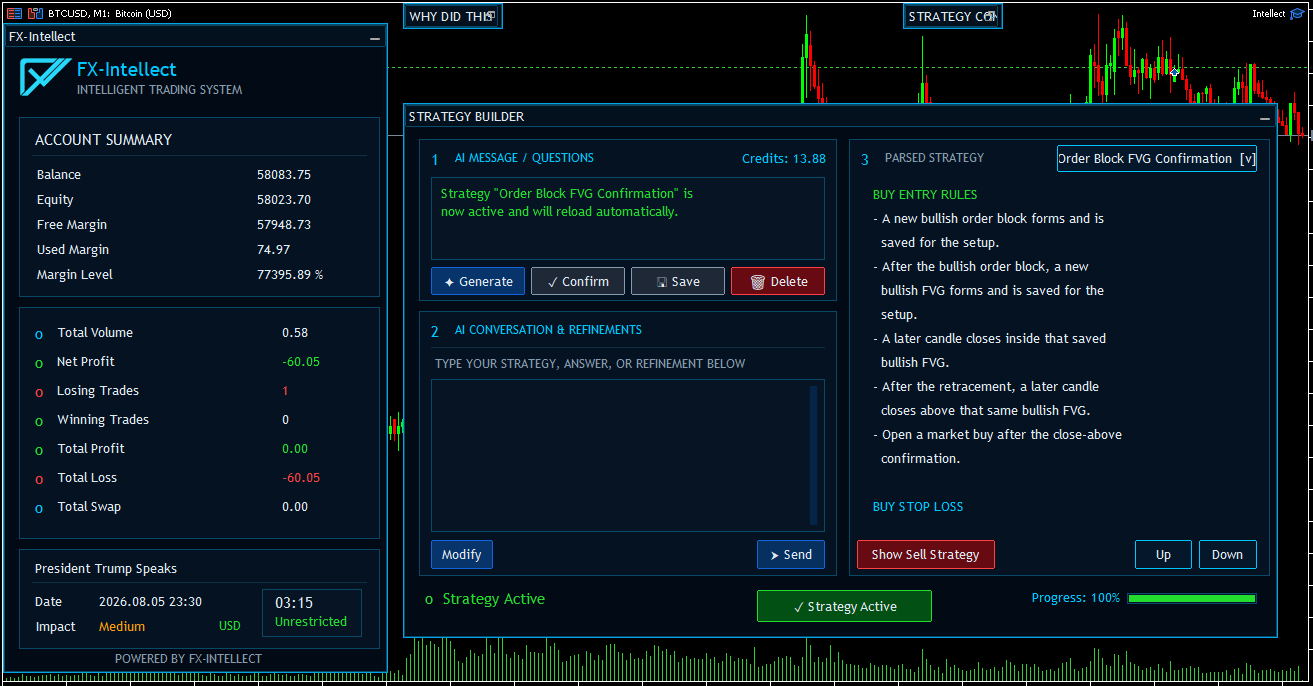
FX Intellect running inside MetaTrader 5 with the account summary, Strategy Builder, and chart controls visible

Build trading strategies directly inside MetaTrader 5—in minutes.

No coding. No technical complexity. Build, backtest, and run live.

Book a Free Setup Session
Free VPS Setup
Get your strategy running 24/7, without down times.
Fully Customizable
Do you have your own indicators? Let's add them to the Strategy Builder. Want to add extra features? We've got you covered. Contact support: support@fxintellect.com

Describe your trading idea, review the strategy, and deploy the finished strategy directly inside MT5—without manually coding every condition. No huge development costs. No waiting for development to be completed. No repeated back-and-forth testing with a developer.

View Access Plans
Runs inside MT5 Build at a fraction of the cost No waiting time Your strategy stays confidential
01

AI Strategy Builder

Write the strategy in your own words and let Intellect convert it into structured buy and sell rules. The conversation panel is used for clarification questions and refinements, while the strategy remains visible for review before it is confirmed.

  • Generate a strategy, answer questions, and modify the same strategy without starting over.
  • Review entry rules, stop loss, take profit, and the separate sell strategy before activation.
  • Confirm, save, delete, switch between saved strategies, and monitor available Intellect Credits.
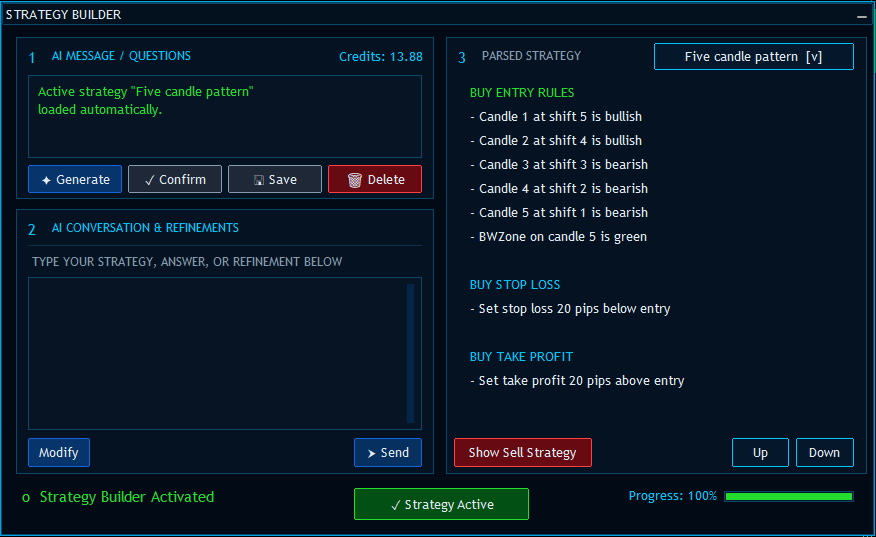
AI Strategy Builder showing a five-candle trading strategy
02

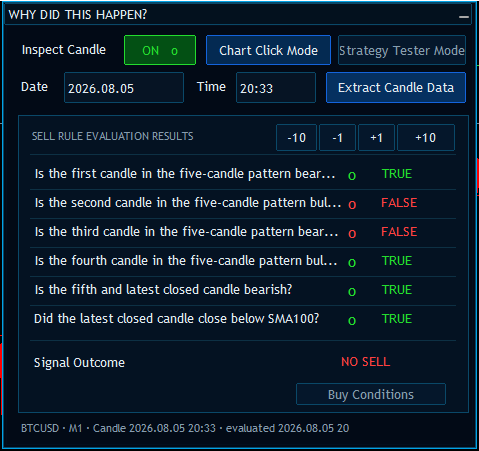
“Why Did This Happen?” Inspector

Inspect a historical or live candle and see the result of every rule that the active strategy evaluated. The panel shows whether each condition returned true or false and then displays the final signal outcome.

  • Choose candles from the chart, enter a date and time, or inspect Strategy Tester activity.
  • Move backward or forward through candles and compare buy and sell evaluations.
  • Diagnose missing trades without guessing which condition blocked the signal.
Rule evaluation inspector showing why a buy signal was not generated
03

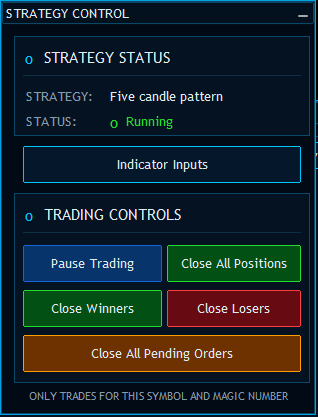
Strategy Control

See which strategy is active and whether trading is running. Operational controls remain available directly on the chart, so the trader can intervene without removing the Expert Advisor.

  • Open the strategy’s indicator inputs and pause or resume trading.
  • Close all positions, only winning positions, or only losing positions.
  • Remove pending orders while limiting actions to the current symbol and magic number.
FX Intellect strategy status and trading control panel
04

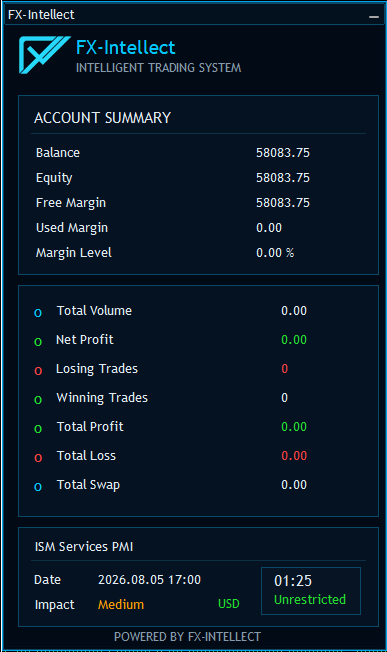
Account and News Summary

Monitor the account from a compact dashboard that combines account health, trading performance, and the next important economic event. The countdown and restriction status help the system respect configured news-trading rules.

  • Track balance, equity, free margin, used margin, and margin level.
  • Review volume, net profit, winners, losers, swap, total profit, and total loss.
  • See the next news event, impact, currency, countdown, and current trading restriction state.
FX Intellect account performance and economic news summary
The interfaces work as one trading system.

The Strategy Builder creates and activates the logic. The engine evaluates that logic on every relevant candle. The inspector explains each decision, while the control and summary panels provide live oversight of execution, account conditions, and news restrictions.

Simple Workflow

Build, confirm, and activate.

1

Describe your strategy

Write the trading rules you want Intellect to understand.

2

Refine the logic

Answer questions and correct anything that is incomplete.

3

Confirm and deploy

Review the strategy, save it, and deploy it in MT5.

Intellect Access

Choose how you want to start.

Start with the seven-day trial or choose the account capacity and monthly credits that fit your workflow.

Start here

7-Day Trial

Explore Intellect, build your first strategies, and test the workflow before choosing a monthly plan.

/7 days
  • Up to 2 trading accounts
  • Seven days of Intellect access
  • Build and refine MT5 strategies
  • Review and save the strategy
  • 25 Intellect Credits included
Maximum access

Premium

For traders managing more accounts who need the highest monthly strategy-building capacity.

/month
  • Up to 10 trading accounts
  • Intellect Strategy Builder access
  • FTMO, Investing.com, Forex Factory, and MT5 news calendars
  • Telegram module included on demand
  • 200 monthly Intellect Credits
Ready to Build?

Install Intellect in MetaTrader 5.

Login, activate an eligible plan, and download the latest Intellect package.

Login to Download Login or create an FX Intellect account to continue.
User Dashboard View your account and trading account details.
Name -
Email -
Selected Plan -
Subscription Status -
Intellect Credits Loading
Monthly Credits -
Purchased Credits -
Total Available -
Credit Package -

Monthly credits reset with your subscription. Purchased credits do not expire.

Cancel Subscription

Are you sure you want to cancel your subscription? You will no longer be billed for this subscription.

Notice